
29 September 2026 · info.fixtechsolution@gmail.com
How to Check IESCO Bill Online with 7Pay
Nobody enjoys waiting for a paper bill that never arrives. The good news is that you can see your electricity charges in under a minute from your phone. This guide explains How to Check IESCO Bill Online, how to download or print a copy, and how to pay it without standing in a queue. Everything here is written for real households and shops served by the Islamabad Electric Supply Company, and it fits neatly with the bill payment tools at 7pay.com.pk.
What Is an IESCO Bill and Why Should You Check It Online?
Your monthly electricity bill shows what you owe for the power you used. Checking it online saves time and helps you avoid late fees.
The Islamabad Electric Supply Company, known as IESCO, issues a monthly electricity bill to every registered consumer in its service area. The bill lists your electricity bill amount, the electricity bill due date, and the electricity units consumed during the billing month. Paper copies can arrive late or get lost, which is why an IESCO online bill check has become the easiest habit for busy families. You see the same figures the meter reader recorded, only faster.
How to Check IESCO Bill Online in Four Simple Steps
The process is short and works on any phone or laptop. Keep your bill or account details nearby.
Follow these steps:
- Open the official IESCO bill portal or a trusted payment site such as 7Pay.
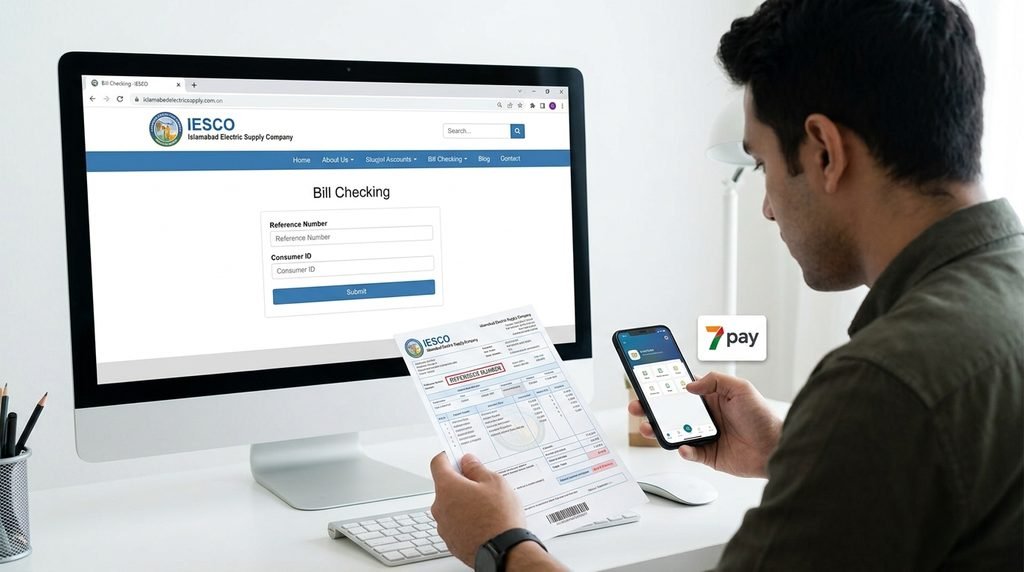
- Enter your 14-digit reference number or your consumer ID.
- Submit the details and wait for the page to load.
- Review the amount, due date and units, then save or pay.
If you only remember one thing about How to Check IESCO Bill Online, make it this: the reference number is the fastest key to your account. This IESCO bill online method needs no login on most portals, so it takes seconds. Always confirm the name and address shown before you trust the result. That small habit is a basic form of online electricity bill verification.
How to Check IESCO Bill Online by Reference Number
This is the most reliable way to see your charges. It works for both homes and businesses.
Your IESCO reference number is printed at the top of every bill. It is a 14-digit reference number, and it never changes unless your connection changes. For an IESCO bill check by reference number, type all 14 digits without spaces, then press the search button.
Tips for entering it correctly:
- Copy the digits exactly as printed, including any leading zeros.
- Do not add dashes or spaces unless the form asks for them.
- Take a photo of an old bill and keep it in your gallery for quick access.
If you have lost every paper bill, ask a neighbour with the same sub-division for the format, or contact the local office. Once you have the number, saving it in your phone makes every future search take a few seconds.
IESCO Bill Check by Consumer ID
Some customers know their consumer ID better than the long reference code. It is a valid alternative.
The consumer ID identifies your electricity connection inside the company system. For an IESCO bill check by consumer ID, select the consumer ID option on the search form, enter the number, and submit. The result page shows the same bill details as the reference search. If the system says no record was found, recheck each digit and try the reference number instead.
Which ID Should You Use?
Use the reference number when you have a recent bill. Use the consumer ID when you are searching from an older connection record or a meter installation slip.
Check IESCO Bill Online by CNIC: What You Need to Know
Many people ask whether their national ID alone can open a bill. The honest answer is to be a little more careful.
Most public bill portals do not accept a CNIC as a direct search field. Instead, your CNIC works as proof of identity. If you cannot find your account number, you can contact IESCO customer service with your CNIC, name and address, and ask them to confirm your reference number. Once you have it, you can Check the IESCO bill online by CNIC details in the sense that your identity unlocks the number, and the number unlocks the bill. Never share your CNIC on unofficial websites or in random chat groups.
IESCO Bill Download and Print Online
A saved copy is useful for rent records, office reimbursement and bank forms. Once you know How to Check IESCO Bill Online, saving a copy takes seconds.
After your bill appears on screen, look for the download or print button. For an IESCO bill download, choose the option to save an electricity bill and download PDF to your phone. For an IESCO bill print online, open the print view, select your printer, and check that the barcode and payment slip are visible. A clear IESCO electricity bill online copy is accepted by most banks and payment apps when you pay.
Best practice:
- Save each month’s file with the month name.
- Store PDFs in a single folder for easy IESCO bill history tracking.
- Back up important bills to cloud storage.
How to Get an IESCO Duplicate Bill
Lost your bill or received a damaged one? A duplicate is easy to get and carries the same legal weight.
An IESCO duplicate bill is simply another printed copy of the same charges, generated from the same account. After you learn How to Check IESCO Bill Online, getting a copy is easy. Enter your reference number, open the current bill, and print it. This gives you a duplicate electricity bill copy that shows the same amount and due date. If the portal is down, IESCO customer service can guide you, or you can ask your sub-division office for a stamped copy. Keep in mind that a duplicate is not a new bill, so pay only once.
How to Check IESCO Bill Online Using 7Pay
7Pay brings bill viewing and payment together, so you do not need to jump between different sites.
At 7pay.com.pk you can look up your electricity charges and settle them from the same place. Enter your reference number, confirm the details, and choose how to pay. IESCO bill payment online through 7Pay is designed to be quick, clear and secure, with a digital receipt you can keep for your records.
Why customers choose 7Pay:
- One place for bill checks and payments.
- Secure processing with clear confirmation messages.
- Payment receipts saved for later reference.
- Other services such as mobile recharge and money transfer in the same wallet.
- Helpful support when something looks wrong.
Design note: Add a button here labeled “Pay Your Electricity Bill with 7Pay” linking to the bill payment page.
How to Check IESCO Bill Online: Comparison of Methods
This table shows which method suits which situation. Use it as a quick decision guide.
If you are still unsure about How to Check IESCO Bill Online, compare the options below and pick the one that matches the details you have.
| Method | What You Need | Speed | Best For | Payment Option |
| Reference number | 14-digit reference number | Very fast | Regular monthly checks | Yes, through 7Pay |
| Consumer ID | Consumer ID from records | Fast | Older connection records | Yes, through 7Pay |
| CNIC via customer service | CNIC and address proof | Slower | Lost account number | After number is found |
| Paper bill | Physical copy | Depends on delivery | Backup only | Manual |
| 7Pay bill page | Reference number | Very fast | Checking and paying together | Instant |
Understanding Your Monthly Electricity Bill
A bill can look confusing at first. Knowing each line helps you spot mistakes before you pay.
Here are the main parts of a typical monthly electricity bill:
- Electricity meter reading: The previous and current readings taken from your meter.
- Electricity units consumed: The difference between the two readings, measured in units.
- Electricity bill taxes and charges: Fuel adjustment, general sales tax, and other government-set items added to the base rate.
- Electricity bill amount: The final total you must pay.
- Electricity bill due date: The last day to pay without a late surcharge.
Compare the units on your bill with the reading on your meter. A big jump usually means higher appliance use in summer, but it can also signal a wrong reading. In that case, raise a complaint through IESCO customer service with a photo of your meter.
Common Problems and Quick Fixes
Most errors come from small typing slips. These fixes solve nearly every case.
- Bill not found: Recheck the number and try the other ID type.
- Wrong name shown: Do not pay. Contact the sub-division office.
- Portal not loading: Try again later or use another browser.
- Old month displayed: Refresh the page and search again.
These points matter because How to Check IESCO Bill Online only works well when the details you enter are exact. A blank result rarely means you have no bill. It usually means a digit is off.
Frequently Asked Questions
1. Is it safe to follow How to Check IESCO Bill Online steps on my phone? Yes, as long as you use the official portal or a trusted platform like 7Pay. Never enter your CNIC on unknown sites.
2. What is my IESCO reference number? It is a 14-digit number printed at the top of your monthly bill. Save it once and reuse it every month.
3. Can I check my IESCO bill without the reference number? Yes, try your consumer ID, or ask IESCO customer service to confirm your number using your CNIC and address.
4. How do I do an IESCO electricity bill check online Pakistan wide? The same steps work from anywhere in Pakistan or abroad. You only need internet access and your account number.
5. Where can I see my IESCO bill history? Search your reference number for recent months, or keep saved PDFs. This makes comparing units and charges simple.
6. Is an online copy valid for payment? Yes, a printed or saved copy shows the same amount and due date. Most payment channels accept it.
7. Can I pay my bill on 7Pay after I check it? Yes, 7Pay lets you view the amount and pay in a single flow. You receive a digital receipt after payment.
8. What if my bill amount looks too high? Compare the units consumed with your meter reading. If they do not match, contact IESCO customer service with a photo.
Conclusion
You now know How to Check IESCO Bill Online, how to download or print a copy, and how to fix common problems. Start with your reference number, confirm the details, and keep a PDF for your records. When you are ready to pay, 7Pay keeps everything simple, safe and on time.
CALL TO ACTION
Pay Your Bill on 7Pay (link to https://www.7pay.com.pk/)